Whatsminer P21 Series PSU Repair Guide & Components List (2026 Update)
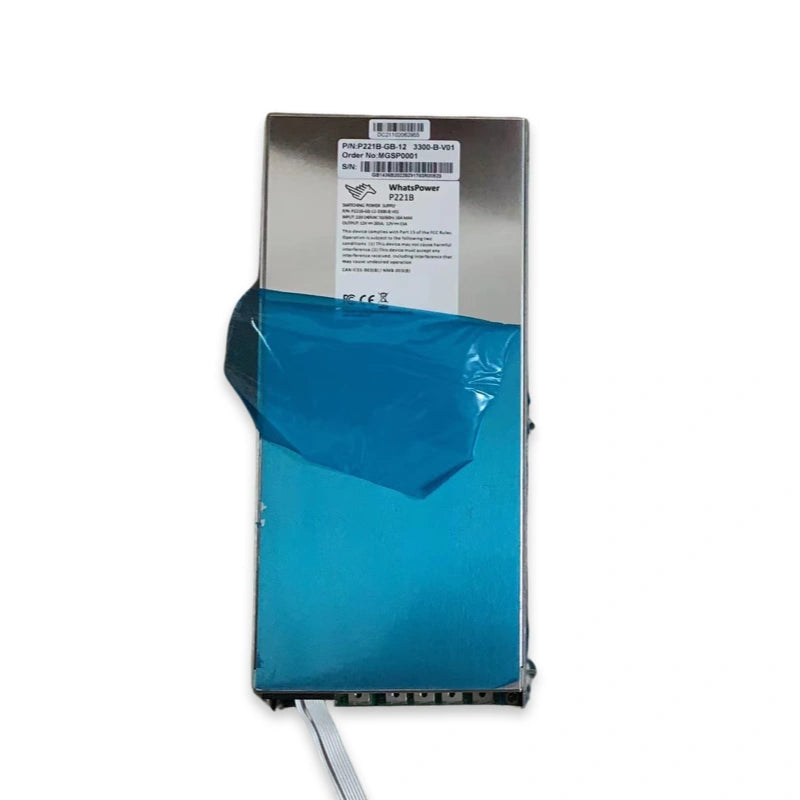
The Whatsminer P21 PSU is MicroBT's previous-generation power supply unit — used on the M20, M21, M21D, M20S, M21S series (early hardware) and the M30S, M30S+, M30S++, M31S, M31S+, M32 series (mid-cycle). Built around an LLC resonant half-bridge topology with NCP1399AC controller and STM32F334 digital control, the P21 was the workhorse PSU for MicroBT's deployed fleet before the newer P221 / P222 families took over on M50 and M60 chassis. This guide covers the 18 most vulnerable components, the most common "no-output" failure mode (loose M6 copper-bar bolts, not dead silicon), and the full diagnostic and repair workflow with direct sourcing links — paired with our companion Whatsminer M50 hashboard repair guide and CB4 V10 H6 control board repair guide for full-miner repair coverage.
Why P21 PSU Repair Matters in 2026
The P21 series PSU covers an enormous installed base — every M20-class through M32-class Whatsminer in production from 2019 to 2023 shipped with a P21-family power supply. With many of these miners still hashing profitably in low-cost-power environments post-halving, keeping the P21 fleet operational is the highest-leverage way to maintain capacity without buying new hardware. A full PSU replacement runs significantly more than the components needed for a chip-level or contact-level repair, and the most common P21 failure mode is mechanical (loose busbar contact) rather than silicon failure.
Compatible Whatsminer Models
The P21 PSU family powered the following Whatsminer models:
- M20 / M21 generation: M20, M21, M21D, M20S, M21S
- M30 generation: M30S, M30S+, M30S++, M31S, M31S+, M32
Newer M50 / M60 series miners use the next-generation P221 / P222 families instead — but the failure modes, diagnostic workflow, and many of the chip-level components carry across the generations. The M6 copper-bar bolt failure pattern in particular applies identically to P221 and P222 PSUs on M50 / M60 / M66 chassis.
P21 PSU Architecture at a Glance
The P21 is a high-power LLC resonant half-bridge switching supply with digital control. Key architectural elements:
- Input stage: 20A 250V glass fuse, NTC 8D-20 inrush thermistor, GBJ 3510 35A bridge rectifier (primary input rectification), GBU608 6A bridge rectifier (auxiliary), HF32F-G 012HS relay for inrush bypass.
- Primary switching: high-voltage N-channel MOSFETs (GP47S60X TO-247, IPA60R060P7, STW48N60DM2 600V, JCS12N65FT 650V TO-220MF, OSG65R069HS 700V / 159A) form the resonant half-bridge.
- LLC controller: NCP1399AC offline half-bridge resonant controller (20kHz-750kHz operating range, 16-pin SOIC) drives the primary side.
- Digital control / supervision: STM32F334R8T6 32-bit ARM Cortex-M4 microcontroller (72 MHz, 64KB Flash) handles output regulation, fault monitoring, and host-side I²C communication. This MCU contains the PSU current and voltage calibration parameters — it cannot be swapped without re-calibration.
- Isolation: SI8261BBD isolated gate driver bridges the primary-to-secondary control signals.
- Secondary stage: NTMFS5C430NL and P40T15GU N-channel MOSFETs handle synchronous rectification and output switching.
- Auxiliary: BCX53 PNP and BCX56-16 NPN small-signal transistors handle protection and gate-drive support; 500V 250µF bulk capacitor on the primary bus.
Most Common P21 PSU Failure Modes
- No DC output (AC input LED green, fan spinning, but 0V on the 12V busbars) — in approximately 95% of cases this is not a dead PSU. It is loose M6 copper-bar bolts on the hashboard-side output. Factory torque often ships at ~2.0 N-m versus a 2.5-3.5 N-m spec, and the joint settles after thermal cycling. Always check the M6 bolt torque before chasing silicon failures. (See diagnostic workflow below.)
- Output oscillates between 0V and 12V (protection latching and un-latching) — same root cause as above, or a near-short downstream causing the protection IC to retry.
- PSU dead after AC input — check the 20A 250V glass fuse first. A blown fuse usually points to a downstream short on the primary switching stage (one of the high-voltage MOSFETs).
- Hard short on primary switching — typically a failed GP47S60X, IPA60R060P7, or STW48N60DM2 MOSFET. Test in diode mode before powering up — a healthy MOSFET shows 0.3-0.6V drop between drain and source.
- LLC controller fault — failed NCP1399AC resonant controller prevents the half-bridge from oscillating; no high-frequency switching means no transformer output.
- MCU / communication fault — failed STM32F334R8T6 prevents the PSU from talking to the control board. Cannot be replaced arbitrarily — the MCU stores calibration parameters that need to be re-flashed and verified after replacement.
- Inrush failure / AC LED dark — degraded NTC 8D-20 thermistor or failed HF32F-G 012HS relay prevents the inrush bypass from engaging.
- Synchronous rectification failure — failed NTMFS5C430NL or P40T15GU on the secondary side produces low or unstable output voltage.
Critical Components — Function & Failure Behaviour
NCP1399AC LLC Resonant Controller
The NCP1399AC is the heart of the P21's primary stage — an offline half-bridge resonant controller operating from 20 kHz to 750 kHz, packaged in 16-pin SOIC. A failed NCP1399AC produces a PSU that powers on but generates no high-frequency switching, leaving the transformer secondary with no output. Verify the controller's VCC supply (typically derived from the auxiliary supply) before replacing.
STM32F334R8T6 Digital Control MCU
The STM32F334R8T6 is the 32-bit ARM Cortex-M4 microcontroller (72 MHz, 64 KB Flash, LQFP-64) that handles digital regulation, fault monitoring, and host communication. Critical caveat: the MCU stores the PSU's current and voltage calibration parameters in internal Flash. Arbitrary replacement without re-calibration produces a PSU that reports wrong values to the miner control board, triggers protection codes, or runs out of regulation. If the MCU must be swapped, a programmable DC load and the AATE calibration tooling are required to restore factory specs.
SI8261BBD Isolated Gate Driver
The SI8261BBD isolated gate driver bridges the primary-secondary boundary on the gate-drive signal path. A failed SI8261BBD breaks the gate-drive isolation and can produce either no switching at all or unsafe switching behaviour.
Primary Switching MOSFETs
The P21 uses a stack of high-voltage N-channel MOSFETs on the primary half-bridge: GP47S60X (TO-247), IPA60R060P7, JCS12N65FT (TO-220MF, 650V enhancement-mode), STW48N60DM2 (600V), and OSG65R069HS (700V / 159A). The original article labelled some of these as "transistors" but they are all power MOSFETs. Test in diode mode: a healthy MOSFET shows 0.3-0.6V drop between drain and source. A shorted MOSFET is the most common cause of a blown 20A 250V fuse.
Secondary Synchronous Rectification
The NTMFS5C430NL single N-channel power MOSFET and the P40T15GU (DFN5x6-8L, 40V / 150A) handle synchronous rectification on the secondary side. A failed sync MOSFET produces low or unstable output voltage even when the primary side is switching correctly.
Bridge Rectifiers & Input Protection
The GBJ 3510 (35A primary input bridge rectifier) and GBU608 (6A auxiliary bridge) convert AC input to DC for the primary stage. The 20A 250V glass fuse protects the input from catastrophic failures, and the NTC 8D-20 thermistor (8Ω, 6A, 20mm) limits inrush current at power-up. The HF32F-G 012HS relay bypasses the NTC after inrush.
Small-Signal Transistors
The BCX53 (AL marking, PNP, SOT-89) and BCX56-16 (BL P11 marking, NPN) bipolar transistors handle gate-drive support, protection-circuit switching, and auxiliary functions. Failures usually produce subtle symptoms (current limit tripping early, protection mis-triggering) rather than dead PSU.
Bulk Capacitor (500V 250µF)
The 500V 250µF (35mm diameter) electrolytic capacitor holds the primary-side DC bus voltage after rectification. A degraded or dried-out bulk cap produces ripple on the primary rail that the LLC controller cannot regulate out, leading to output instability under load. Visual inspection for swollen tops or leaked electrolyte is the first check.
Whatsminer P21 PSU Repair Components List
The table below lists every component LYS Shenzhen stocks for P21 PSU repair. Each entry links directly to the corresponding part page — contact us at contact@lys-sz.com for bulk pricing, for the 500V 250µF bulk capacitor, or for complete P21 PSU replacement units.
| Part Number | Component Type | Typical Position / Role |
|---|---|---|
| 500V 250µF (35mm) | Electrolytic capacitor | Primary-side DC bus bulk — contact us for stock check |
| GBJ 3510 | Bridge rectifier | 35A primary input rectification |
| GP47S60X | N-channel MOSFET | TO-247 primary half-bridge switching |
| IPA60R060P7 | N-channel MOSFET | High-voltage primary switching |
| JCS12N65FT | N-channel MOSFET | TO-220MF, 650V enhancement-mode |
| NTC 8D-20 | Thermistor | 8Ω / 6A inrush current limiter, 20mm |
| NCP1399AC | LLC resonant controller | Offline half-bridge, 20kHz-750kHz, 16-pin SOIC |
| HF32F-G 012HS | High-power relay | 10A switching, inrush bypass after NTC |
| STM32F334R8T6 | Microcontroller | 32-bit ARM Cortex-M4, 72MHz, 64KB Flash, LQFP-64, calibration storage |
| SI8261BBD | Isolated gate driver | Primary-secondary isolation on gate-drive path |
| 20A 250V Glass Fuse | Fuse | Fast-acting AC input overcurrent protection |
| GBU608 | Bridge rectifier | 6A single-phase auxiliary rectification |
| BCX53 (AL) | PNP transistor | SOT-89, gate-drive / protection support |
| BCX56-16 (BL P11) | NPN transistor | Medium-power, auxiliary switching |
| STW48N60DM2 | N-channel MOSFET | 600V high-efficiency primary switching |
| NTMFS5C430NL | N-channel MOSFET | Secondary synchronous rectification |
| OSG65R069HS | N-channel MOSFET | 700V / 159A primary switching |
| P40T15GU | N-channel MOSFET | DFN5x6-8L, 40V / 150A output stage |
The M6 Copper-Bar Bolt Issue — Fix Before Replacing Silicon
The single highest-yield diagnostic for a P21 "no output" complaint is the M6 copper-bar bolt re-torque check. In approximately 95% of cases where a P21 shows AC input LED green and PSU fan spinning but 0V (or oscillating 0V↔12V) on the 12V output busbars, the cause is loose hashboard-side M6 bolts — not failed silicon inside the PSU. Run this check before opening the PSU case.
Signature symptoms (mechanical fault, not silicon)
- PSU AC input LED is green / lit, PSU fan is spinning.
- DMM on the four 12V output busbars reads 0V continuously, or oscillates between 0V and 12V.
- Control box shows zero LEDs, no fans, no boot sequence — clearly not getting 12V.
- Fault appeared after a recent move, transport, vibration event, summer/winter thermal cycle, or months of un-touched runtime.
- Visible discolouration (blackened or blued) on one or more M6 bolt heads at the output.
- One or more M6 bolts can be turned by hand or with very low torque before the wrench clicks.
- Lock washer missing under one or more M6 bolts.
- No burning smell, no scorched silicon, no swollen caps — unit looks externally healthy.
Re-torque procedure
- Kill AC at the breaker / PDU. Wait 60 seconds for bulk caps to discharge.
- Remove the PSU-side cover (typically 4-6 Phillips screws).
- Use a calibrated torque screwdriver in the 0.5-5 N-m range — NOT a hand-tightened Phillips. Eyeball torque on a 12V / 95A joint is a fire hazard.
- Loosen each M6 bolt 1/8 turn first (this resets the metal contact pressure), then re-torque to 3.0 N-m (spec range 2.5-3.5 N-m; aim for the middle).
- Watch for cocked or cross-threaded hardware. Replace any bolt that does not seat flat.
- While the bolt is loose, inspect the lock washer (split-ring should be present, not flattened), the ring terminal on the harness (no cracks at the crimp, no greenish corrosion), the bolt threads (clean, not stripped), and the busbar contact surface (no blackening or bluing).
- If the contact surface is blackened: polish with a brass brush (not steel) to bright copper, wipe with 99% IPA, apply a thin film of no-ox conductive grease (Noalox or equivalent) before re-torquing.
- Re-assemble, route the output harness without pinching against the chassis, apply AC and verify the miner boots.
- Set a re-torque calendar reminder for 6-12 months out. This is the single highest-yield preventive maintenance action for any P21-class Whatsminer.
- Audit the control-box-side busbars at the same time — the harness terminates at another set of M6 bolts at the control box, same fault mode applies.
Healthy P21 telemetry baseline
After a clean re-torque, the P21 should produce: V_out at 12.0-12.3V continuous, ripple under 0.1V, I_out stable within ±3% of expected for the miner's tune. If V_out is drooping more than 0.3V under load even after a clean re-torque, you have a deeper PSU issue (aged silicon, drifting sense resistor) and the re-torque bought you time, not a permanent fix.
Internal PSU Diagnostic Workflow (When the M6 Re-Torque Doesn't Fix It)
If the M6 bolt re-torque check is clean and the rail still won't come up, you have a genuine PSU internal failure. Run the following diagnostic sequence before component-level rework:
- Disconnect AC and remove the PSU from the chassis. Wait 60 seconds for the bulk capacitor to discharge.
- External visual inspection — check the case for overheating discolouration, deformation, burning smells, or scorched silicon visible through ventilation slots.
- Internal visual inspection — remove the case cover (typically 6 housing screws + 5 PCB screws, disconnect fan socket cable first). Look at component-side and solder-side for burnt MOSFETs (Q86/Q22/Q21/Q23/Q41/Q84 positions are common burn-out locations), blown 20A 250V fuse, blackened resistors, swollen capacitors, or arcing marks between components and the heatsink.
- Diode-mode test of every primary MOSFET — set DMM to diode mode. A healthy MOSFET shows 0.3-0.6V drop between drain and source. Anything outside that range is a breakdown failure. Test GP47S60X, IPA60R060P7, JCS12N65FT, STW48N60DM2, and OSG65R069HS in sequence.
- Diode-mode test of bridge rectifiers — GBJ 3510 and GBU608 should also show 0.3-0.6V drop per junction in the forward direction. Open circuit or short = replace.
- Synchronous rectification check — connect the multimeter black probe to ground, use the red probe to measure resistance between the gate (G) terminal of the NTMFS5C430NL / P40T15GU sync MOSFETs and ground. Resistance below 1.5 kΩ indicates a failed device.
- MCU voltage check — measure the STM32F334R8T6 supply voltage in voltage mode. Standard reading is 3.3V; anything else indicates an auxiliary-supply fault upstream of the MCU.
- Auxiliary supply rail verification — the VCC rail to the NCP1399AC and the auxiliary 3.3V to the STM32F334R8T6 must be healthy before any other circuit will operate. Check these rails first before chasing the high-voltage primary side.
- Component replacement — for MOSFET replacement, use a constant-temperature soldering iron at 400 ±10°C with 3-4 second per-pin contact time. Apply silicone sealant removal carefully (the bigger MOSFETs are usually mechanically secured plus soldered). For surface-mount resistor and capacitor replacement, use 380 ±10°C with 2-3 second contact time.
- Function test after repair — connect the repaired PSU to an electronic load (CC mode at rated current) or to a known-good miner chassis. Verify V_out, I_out stability, ripple under load, and run a 15-minute full-load soak test before discharging the unit from the bench.
- Re-print thermal pads on PCB heatsink contact zones before reassembly — thermal pad failure produces secondary overheating that takes out adjacent silicon weeks after the apparent repair.
P21 Error Codes Linked to PSU Issues
The Whatsminer firmware exposes a set of error codes that often trace back to PSU faults. If the miner reports any of the following codes, run the M6 bolt re-torque check first, then the internal PSU diagnostic sequence above:
- Codes in the 208 to 275 range — typically PSU output voltage / current anomalies.
- Codes 326 and 329 — PSU communication or protection faults.
- Code 8700 — PSU lock / protection state engaged.
- Any error code starting with 0x (hexadecimal) — usually a low-level PSU or PSU-to-control-board signalling issue.
Required Repair Tools & Consumables
- Calibrated torque screwdriver, 0.5-5 N-m range — mandatory for the M6 copper-bar bolt re-torque procedure. Hand-tightening cannot deliver the 2.5-3.5 N-m spec consistently.
- Electronic load (CC mode capable, ≥1200W) — for post-repair verification. A known-good miner chassis can substitute if no programmable load is available.
- Multimeter (Fluke 17B+ or equivalent) with welded steel probe needles.
- IR thermal camera (FLIR One / Seek Thermal) for busbar joint hot-spot detection under load — a uniform 35-50°C rise above ambient is healthy; localised >80°C points to a marginal joint.
- Constant-temperature soldering station rated 150W or higher (400 ±10°C for MOSFETs).
- SMD desoldering station (Pro'sKit SS-331 or equivalent).
- Solder paste M705 grade, no-clean flux, board washing fluid with anhydrous alcohol.
- Brass brush + 99% isopropyl alcohol for cleaning blackened busbar contacts.
- Noalox or equivalent no-ox conductive grease for restored copper contacts.
- Common spare 0402 resistors (0R, 33Ω, 51R, 10K) and 0402 capacitors (0.1µF, 1µF).
- Foam insulation pad for powered bench testing.
When Chip-Level Repair Makes More Sense Than Replacement
A new P21 PSU runs significantly more than the components needed for a chip-level repair. For repair shops handling more than a few P21 units a month, a small inventory of the high-voltage MOSFETs (GP47S60X, IPA60R060P7, STW48N60DM2), the secondary sync MOSFETs (NTMFS5C430NL, P40T15GU), the NCP1399AC controller, the SI8261BBD isolator, the GBJ 3510 bridge rectifier, the 20A glass fuses, and the NTC 8D-20 thermistors covers the majority of bench-repair scenarios. The STM32F334R8T6 MCU is replaceable but requires re-calibration with a programmable DC load — usually it's healthier than the surrounding silicon and rarely needs swapping.
Stop DIY when there is visible cascade damage — scorched output MOSFETs, blued copper at a busbar (joint hit >250°C at some point), swollen capacitor tops on the PSU board, or burn marks on the silkscreen. Replacing only the visibly-broken part leaves adjacent damaged-but-not-yet-failed silicon vulnerable to the next event.
FAQ — Whatsminer P21 PSU Repair
Which Whatsminer models use the P21 PSU?
The P21 PSU was used on the M20, M21, M21D, M20S, M21S series (earlier hardware) and the M30S, M30S+, M30S++, M31S, M31S+, M32 series (mid-cycle). Newer M50 and M60 series miners use the next-generation P221 and P222 PSU families instead.
My P21 shows AC LED green and fan spinning but the miner won't boot. Is the PSU dead?
In approximately 95% of cases this is loose M6 copper-bar bolts on the hashboard-side output, not a dead PSU. Run the M6 bolt re-torque procedure to 3.0 N-m (spec range 2.5-3.5 N-m) before opening the PSU case. If the re-torque doesn't fix it, then proceed to internal PSU diagnostics.
Can I swap the STM32F334R8T6 MCU on a P21 PSU?
Technically yes, but the MCU stores the PSU's current and voltage calibration parameters in internal Flash. Arbitrary replacement without re-calibration produces a PSU that reports wrong values, trips protection codes, or runs out of regulation. MCU replacement requires a programmable DC load and the AATE calibration tooling to restore factory specs.
What is the correct torque spec for the P21 M6 copper-bar bolts?
Spec range is 2.5 to 3.5 N-m; aim for 3.0 N-m in the middle. Factory torque often ships at ~2.0 N-m which is below spec and leads to the joint loosening after thermal cycling. Always use a calibrated torque screwdriver — eyeball Phillips torque on a 12V / 95A joint is a fire hazard.
What error codes on the miner indicate a P21 PSU problem?
Error codes in the 208-275 range, codes 326 and 329, code 8700, and any error code starting with 0x typically indicate a PSU issue rather than a hashboard fault. Run the M6 bolt re-torque check first — most "PSU error" codes on P21-class miners trace back to mechanical contact issues rather than silicon failures.
Sourcing P21 PSU Repair Parts
LYS Shenzhen stocks every component listed above for the Whatsminer P21 PSU. For the 500V 250µF bulk capacitor, calibrated torque screwdrivers, no-ox conductive grease, complete P21 PSU replacement units, or for bulk farm-scale orders, contact our team at contact@lys-sz.com — we operate an on-demand sourcing channel for repair components across the full MicroBT PSU lineup including the newer P221 / P222 series for M50 / M60 chassis.
Worldwide shipping from our Shenzhen warehouse via DHL, FedEx, UPS, and sea freight. DDP shipping available for US and EU customers; case-by-case for other lanes — request a quote with your shipping country for confirmation.